The Playbook · Chapter 04
Your guest list.
A wedding game.
Let the introductions begin.
Two families, several friendship groups, and an uncle everyone has heard about. Put familiar faces into a personalised guessing game and give your guests an easy way to start talking.
About 4 minutes · 4 October 2026 · By Childish Canveeno
The best wedding icebreaker gives people something to do together without putting anyone on the spot. A guest-list Who Am I game turns introductions into playful questions, with your favourite people as the cast.
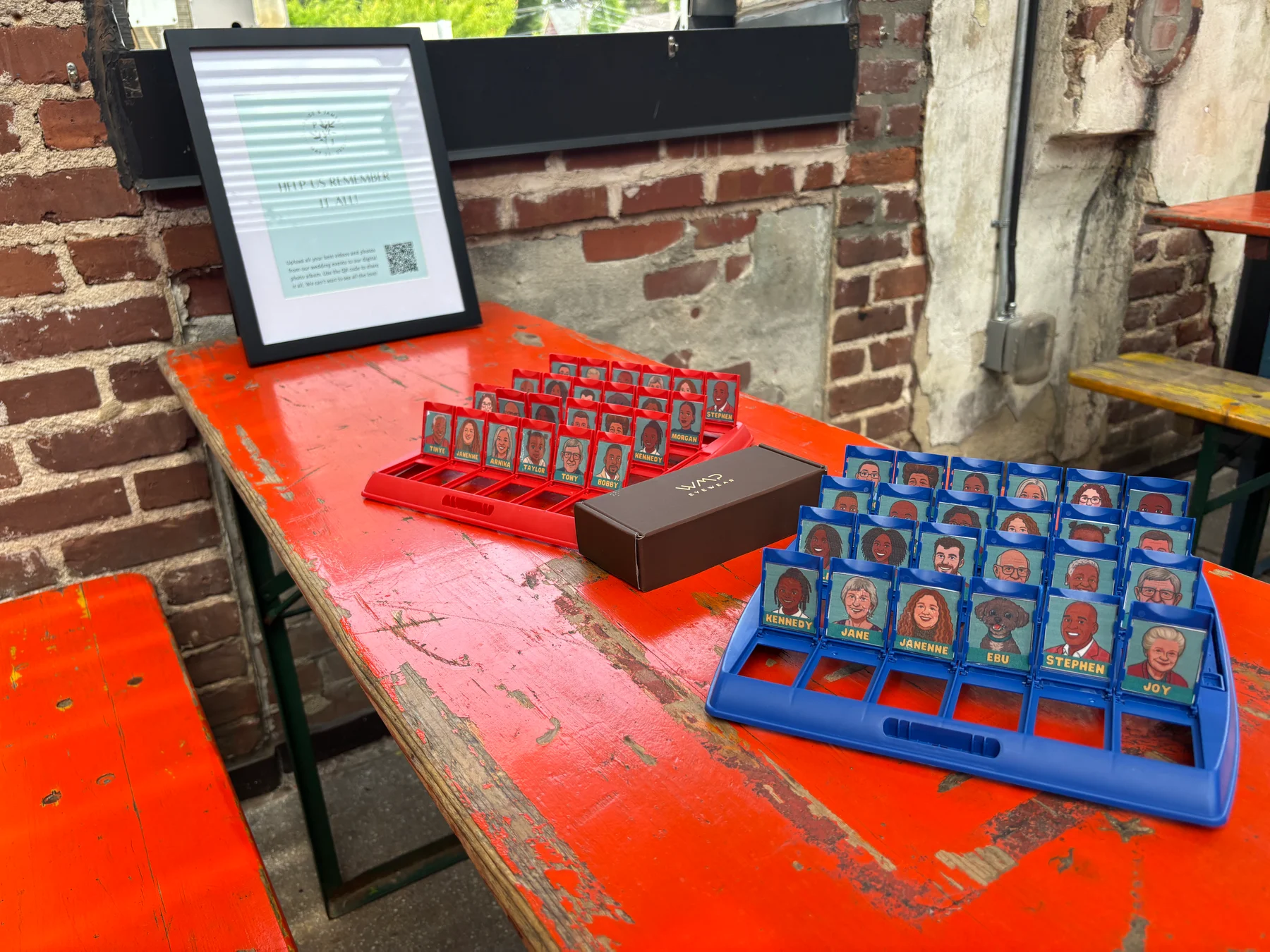
It works as an optional table activity at a welcome gathering, a pre-wedding evening or a quiet corner of the reception. Each board is played by a pair; if you expect several pairs at once, prepare several compatible sets rather than trying to put the whole wedding into one round.
From real celebrations
Guests have already made it their own.
James used the editable template at a pre-wedding event with his guests and family, helping people get to know each other before the big day. His red and blue boards above show the finished setup.
“for everyone to get to know eachother before the big day and it went down an absolute treat!”
— James, Etsy review, 3 October 2026. Read the shop’s customer reviews.
Taylor’s review, dated 3 September 2025, describes using the same editable template for a wedding guest book. That suggests another playful keepsake idea: keep your game cards alongside a separate book where guests can leave messages. This is our suggestion; Taylor’s review does not describe how their guest book was assembled.
Before the confetti
Make the guest list playable.
1. Check your board first.
The Who Am I template is a digital Canva download. It does not include a physical board, printed cards or custom cartoon portraits. Board editions have different card dimensions: measure yours, compare the included sizes and ask us if you are unsure before ordering.
2. Choose a recognisable cast.
Start with enough people to fill your board. Mix both sides of the family and different friendship groups. Ask which photo each guest would like used, choose clear faces with similar crops, and add names people can read easily. Nobody has to be included if they would rather sit this one out.
3. Personalise in free Canva.
Add the photos and names using a free Canva account. Keep the type large and the faces clear; avoid tiny captions and private jokes that only two people understand. For the editing walkthrough, follow our six-step personalisation guide.
4. Test one card before printing the set.
Print at actual size or 100% scale, rather than “fit to page”. Cut one card, put it in your board and check the name stays visible. Once it fits, print the rest using the same settings. Leave preparation time for cutting and assembly; this is a DIY activity rather than a ready-made physical game.
Custom cartoon portraits are a separate service. They normally take up to 10 working days after usable photos arrive, so allow time for the artwork and your printing before the celebration.
At the gathering
A little play, a lot of conversation.
Put a board where people naturally pause, with two chairs and a short instruction card. Invite guests to pair up with someone from another friendship group. Show them how to ask yes-or-no questions, then let the conversation find its own rhythm.
Choose questions about the visible pictures to begin with: glasses, hair, clothing or a smile. Guests do not need to know everyone’s life story to join in. Keep personal questions kind, avoid embarrassing details and offer help with names.
At a welcome evening, the game can break the ice before the wedding day. At the reception, make it a drop-in option away from speeches and formal moments. Leave space for guests who prefer to watch or chat, and keep your usual guest-book signing area separate if you are collecting messages.
Your wedding-game checklist.
- Check board dimensions and the template sizes before buying.
- Choose guest photos and names with their permission.
- Edit in free Canva and check spelling.
- Test-print one card at 100% scale and confirm it fits.
- Print, cut and assemble each board you need.
- Set out clear instructions and comfortable seating.
- Let guests join in at their own pace.
Want to try personalised play first? Join the Play List for the free Mini Mystery kit.
A few quick answers.
Do I need a physical board?
Yes, for the Who Am I game described here. The digital template needs a compatible board, sold separately. Confirm the card size before buying and printing.
Is this suitable for the whole wedding at once?
Each guessing-game board is a paired activity. Prepare multiple sets for several pairs, or let guests take turns. It is a table icebreaker rather than a hosted whole-room game.
Are cartoon portraits included?
No. Add your own photos to the template, or order custom digital portrait artwork separately.
Can we keep it afterwards?
Yes. Keep your printed set as a personal memento and bring it out at family gatherings. Store the board and cards somewhere safe and dry.
Faces you love. Guests who play.
Give the introductions
a little personality.
Check the template details, gather the guest photos and prepare your set before the big day.
See the Who Am I template